
If you've ever looked at the details of a WAV file, you've probably seen numbers like "44.1 kHz" and "16-bit" and wondered what on earth they mean. They sound very technical, but the idea behind them is actually simple. Once you understand it, you'll know exactly why WAV files have such a clean, full sound, and how to pick the right settings for your own audio.
Let's explain it in the easiest way possible, the same way you'd explain it to a child.
How Computers Turn Sound Into Numbers
Sound in the real world is smooth and continuous, like a wave moving through the air. Computers can't store smooth waves directly. Instead, they take many tiny "snapshots" of the sound and save each snapshot as a number. When the file plays back, the computer joins all those snapshots together to recreate the sound.
Think of a flipbook. Each page is a still drawing, but when you flip through them quickly, you see smooth movement. Audio works the same way. The snapshots are the pages, and the playback is the flipping.
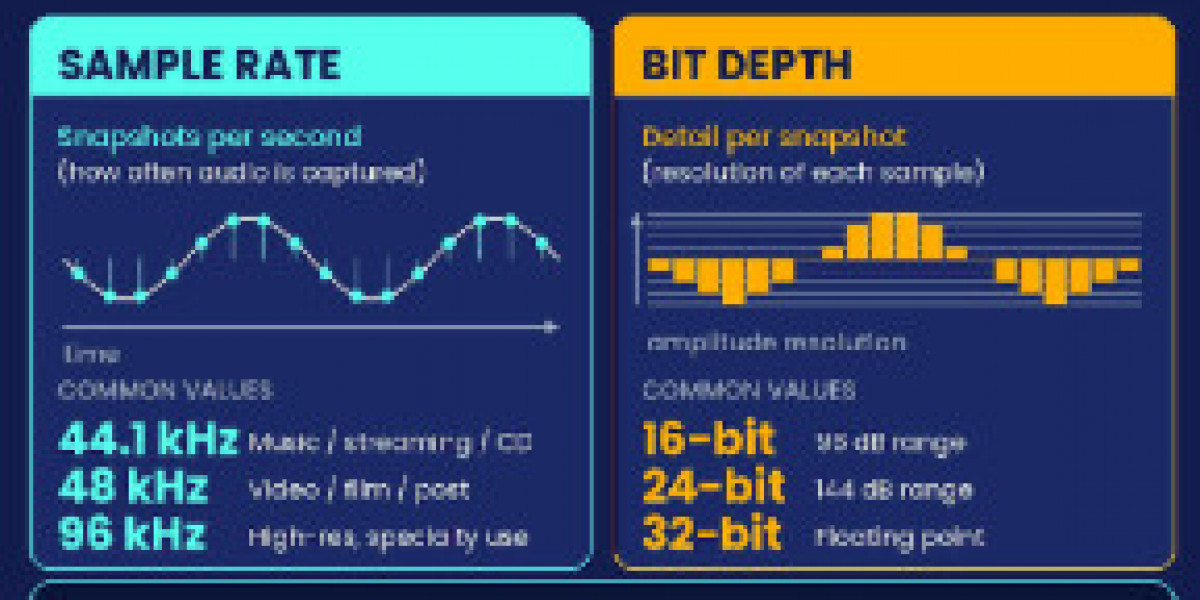
Two things decide how good the final sound will be. How many snapshots are taken every second, and how detailed each snapshot is. Those two ideas are called sample rate and bit depth.
What Is Sample Rate?
Sample rate is simply the number of snapshots taken every second. It's measured in hertz (Hz) or kilohertz (kHz), where 1 kHz means 1,000 snapshots per second.
The most common sample rates you'll see are:
- 44.1 kHz, which is the standard for music and CDs. That's 44,100 snapshots every second.
- 48 kHz, which is commonly used for video and professional audio.
- 96 kHz and higher, which is used in high-end studio recording.
Going back to the flipbook idea, a higher sample rate means more pages per second, so the movement looks smoother. For audio, a higher sample rate captures more of the fine detail in the sound, especially the very high tones.
Here's a fun fact. Human ears can only hear up to about 20 kHz, and a sample rate of 44.1 kHz is enough to capture everything up to that limit. That's why 44.1 kHz became the standard, and why it still sounds great today.
What Is Bit Depth?
Bit depth is about how detailed each snapshot is. Imagine measuring the volume of a sound using a ruler. A ruler with only a few marks can only give rough measurements, like "small, medium, or large." A ruler with hundreds of tiny marks can measure much more precisely.
Bit depth works like the number of marks on that ruler.
- 16-bit gives 65,536 possible volume levels for each snapshot. This is the standard for CDs and everyday music.
- 24-bit gives over 16 million possible levels. This is popular in recording studios because it captures very quiet and very loud sounds with extra accuracy.
- 32-bit goes even further and is mostly used inside professional editing software.
A higher bit depth means smoother, more accurate volume changes and less background hiss in quiet moments. For everyday listening, 16-bit is already excellent. For editing and production, 24-bit gives you more room to work.
Why This Makes WAV Special
Now the reason WAV files sound so good becomes clear. A WAV file stores all those snapshots exactly as they were recorded, without throwing anything away. An MP3 file, on the other hand, removes some of the information to make the file smaller.
So a WAV file with a 44.1 kHz sample rate and 16-bit depth is holding every single snapshot at full detail. Nothing is skipped, nothing is squeezed. That's what people mean when they say WAV is "lossless" or "uncompressed."
This also explains why WAV files are large. More snapshots and more detail per snapshot means more data. A single minute of CD-quality WAV audio takes up roughly 10 megabytes, which is about ten times more than the same minute as an MP3.
Which Settings Should You Choose?
For most people, the answer is simpler than it sounds:
- Just listening or saving a song? 44.1 kHz and 16-bit is perfect. Your ears won't miss anything.
- Working on a video project? 48 kHz is the safer choice, since it matches most video standards.
- Editing, mixing, or producing music? 24-bit gives you extra room to adjust volume and add effects without introducing noise.
Bigger numbers are not always better. If your original recording was made at a lower quality, saving it at a higher sample rate or bit depth won't magically improve it. It will only make the file larger. Think of it like putting a small photo into a huge frame. The frame is bigger, but the picture is still the same.
How This Connects to Converting YouTube Audio
Here's something worth knowing. The audio you hear on YouTube has already been compressed by the platform before you ever download it. So when you use a youtube to wav converter, you're not creating quality that wasn't there. You're saving the sound in a format that won't lose any further quality during editing or playback.
That's still valuable. Every time a compressed file like MP3 is edited and saved again, it loses a little more quality. Converting to WAV first stops that cycle, so your editing starts from a stable, uncompressed base. If you'd like to try it, this youtube to wav converter lets you convert a video to WAV in a few clicks.
A Quick Word on Responsible Use
As with any audio you download, keep it for personal use, learning, or projects where you have permission. Music and recordings belong to their creators, so avoid publishing or selling audio that isn't yours. Using royalty-free or Creative Commons sources is a great way to work freely without worrying about copyright.
Summary in Plain Words
Let's put it all together in a few short lines:
- Sample rate is how many snapshots of sound are taken every second.
- Bit depth is how detailed each snapshot is.
- WAV keeps every snapshot at full detail, which is why it sounds so clean.
- 44.1 kHz and 16-bit is great for listening, and 24-bit is better for editing.
Final Thoughts
Audio terms can look scary at first, but they're really just describing how a computer draws a picture of sound. More snapshots and finer detail give a smoother, cleaner result, and WAV is the format that keeps all of it.
Next time you see numbers like 44.1 kHz or 24-bit, you'll know exactly what they mean. And whenever you need to save audio from a video, any reliable youtube downloader that supports WAV output will let you keep that quality intact for whatever you're creating next.








